
Equipment in StruXure is the plant and machinery on your jobs: lifts, loaders, cranes, generators. It's kept in two places, and the daily report uses both.
The organization list
Most of the equipment you use is the same from job to job, so your company keeps it once, in Settings → Equipment. Each item has a name, an optional description, and whether it's Owned or Rented.
A change to an item on the organization list reaches every project that carries it. See Your organization's equipment list.
A project's equipment
Each project has its own equipment list. Open it from Equipment under Lists in the project sidebar. The page is called Project Equipment.
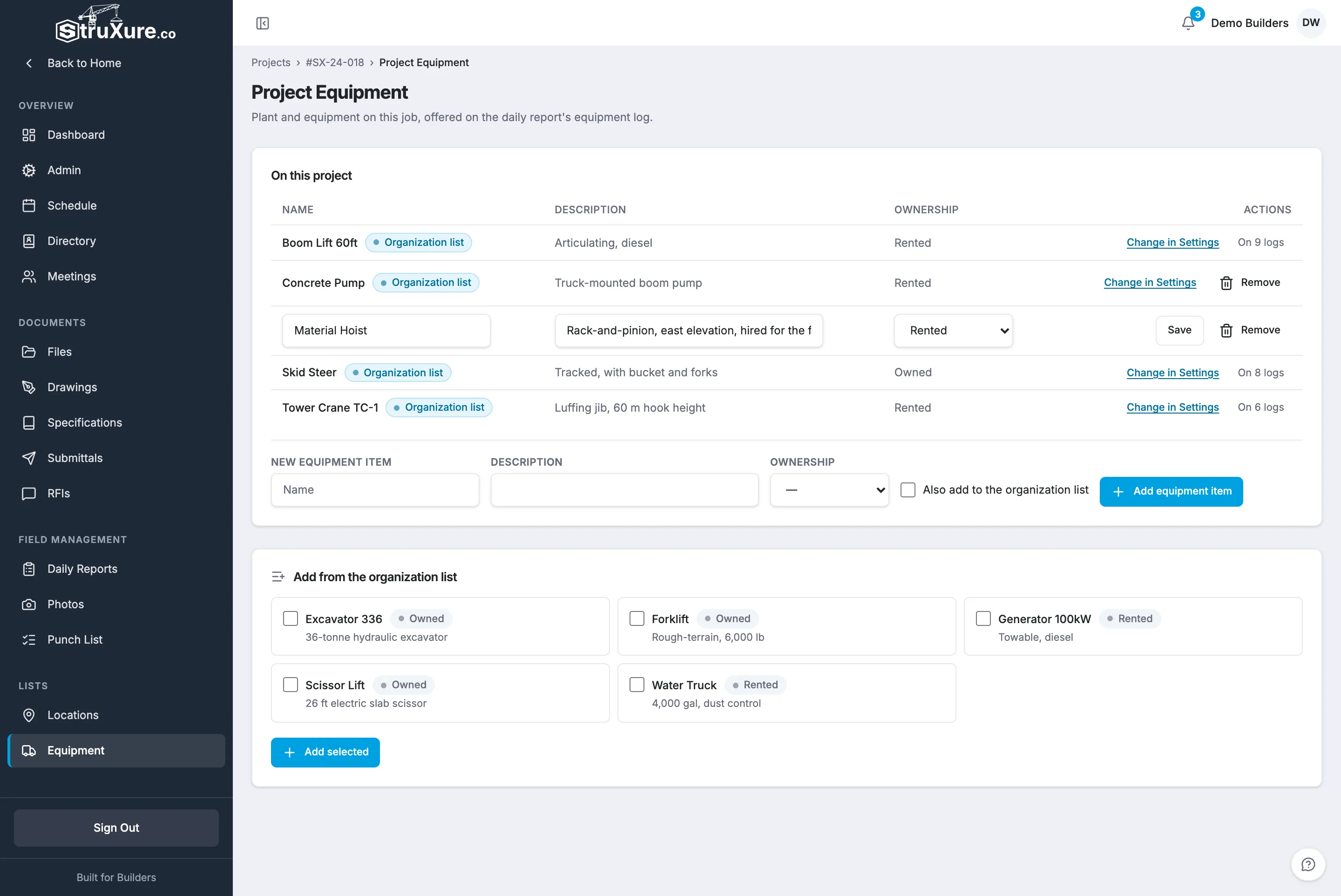
A project's equipment comes from two places:
- From the organization list. Tick items under Add from the organization list. These carry an Organization list badge and are changed only in Settings, so every project keeps the same name and details.
- One-off items, typed in for this project alone, such as a hoist hired for one job. You can edit these on the project. You can also put a new one on the organization list at the same time.
See Add equipment to a project.
The daily report's equipment log
On a daily report, Equipment Logs record which equipment was used that day, for how many hours, and whether it sat idle. The Equipment field lists the project's equipment first, then the rest of the organization list. Picking an organization item that the project doesn't have yet adds it to the project when the entry is saved, so nobody has to set it up beforehand. See Log equipment on a daily report.
Once an item is on a daily report's equipment log, it stays on the project, so the log never loses the name of what was on site.