
By default, a day is finished with Complete Day and sent straight away. Turn approvals on and a finished day is Submitted for Approval instead: it's locked, an Approver checks it, and it's sent only once they approve it.
Approvals and Approvers are set for the whole workspace, and each project can follow that or set its own.
For one project
Open the project and choose Admin in the sidebar.
Find the Daily Report Approvals card.
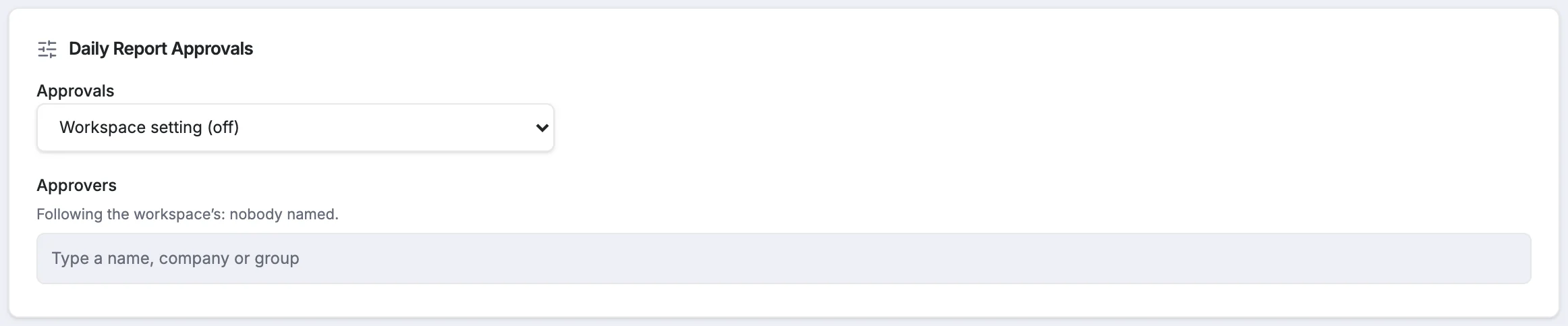
Under Approvals, choose:
- Workspace setting (on) or Workspace setting (off) to follow the workspace,
- On: finished days go to an Approver, or
- Off: Complete Day is final.
Under Approvers, add the people who should approve this project's reports. Only people who can approve daily reports on this project are listed. Leave it empty to use the workspace's Approvers; the card says who those are.
Click Save in the bar at the bottom right.
For the whole workspace
Company admins set the workspace default in Settings › Module defaults, on the Daily Report Approvals card. Tick Daily Reports need approval and choose the Default Approvers, then click Save approvals. Projects that follow the workspace pick up the change straight away.
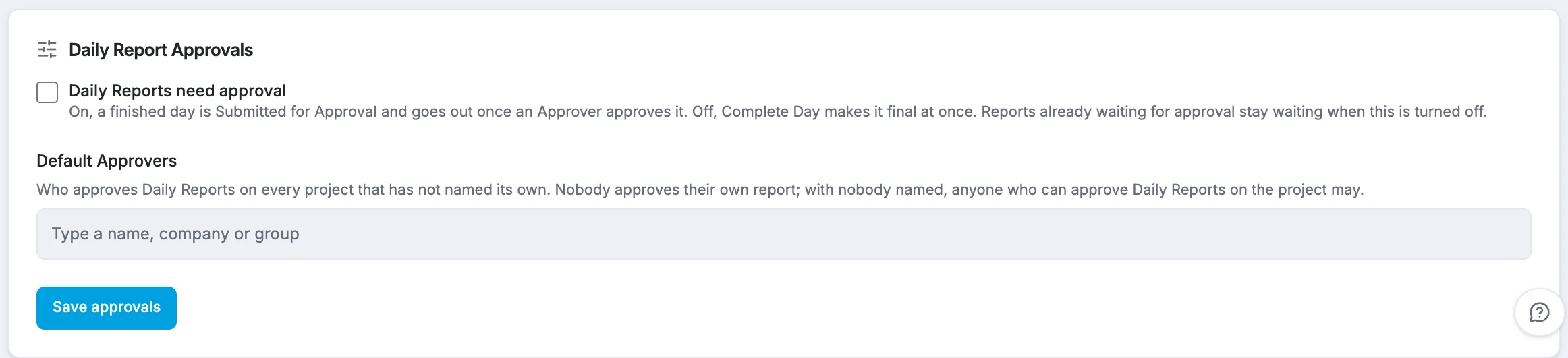
How Approvers are decided for a day
- A named Approver who can approve on the project and didn't submit the day may approve it.
- If nobody named can approve on the project, anyone with approval access there may. Project admins see a note about this on the day and on the card.
- Nobody approves their own report.
Changing the setting
- Turning approvals off doesn't release days already waiting: they stay Submitted until an Approver acts or the author withdraws them.
- Turning approvals on affects days finished from then on. Days already Complete stay Complete.
Changes to these settings are recorded in the activity log.