
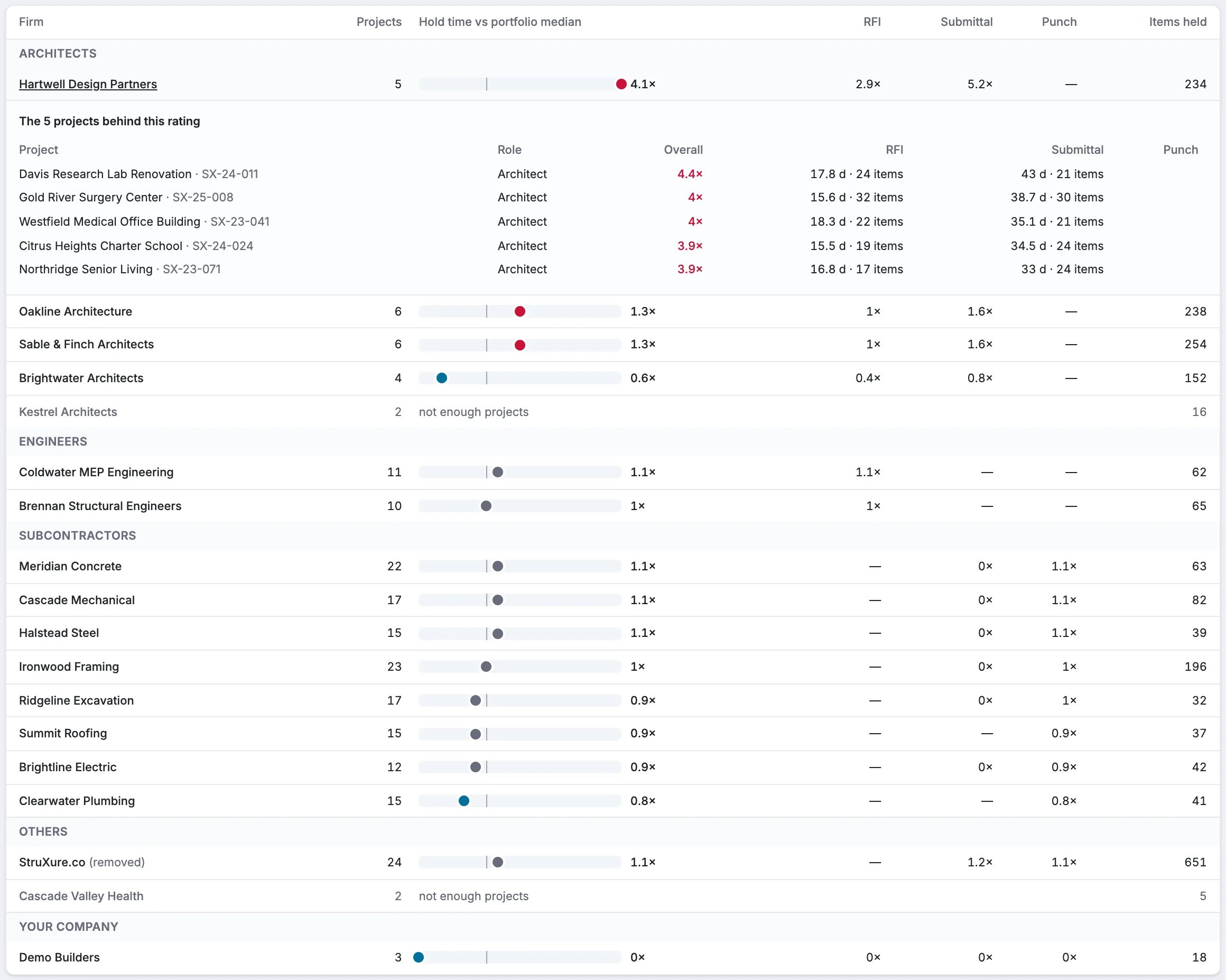
The Firms tab rates each company by how long RFIs, submittals and punch items waited on it, compared with every firm on the projects shown.
- Open Reports and click the Project Health tab.
- Click Firms (beside Projects).
- Use the Projects, Type, Office and Stage filters as on the Projects tab; they apply to the firms too.
How a firm is rated
- Hold time is the working days a record waited on the firm. A person's time counts towards their company.
- For each record type (RFI, submittal, punch), the report takes every firm's working days per item on every project shown, and finds the median. The note under the table gives those medians.
- A firm's figure for each type is its own working days per item across its projects, divided by that median. 1× is typical, 2× is twice as slow, 0.5× twice as fast.
- The overall Hold time vs portfolio median combines the types, weighted by how many items of each the firm held.
- A firm is rated only if records waited on it on 3 or more of the projects shown. Others are listed in grey with not enough projects.
The dot on the bar is red when the firm is more than 1.15× the median, blue when it's under 0.85×, and grey between.
The columns
- Firm: the company. "(removed)" means it has since been removed from the Directory.
- Projects: projects where records waited on it.
- Hold time vs portfolio median: the overall figure.
- RFI, Submittal, Punch: the figure for each type. "—" means it held none of that type. Point at a cell to see the working days per item and the number of items.
- Items held: every record that waited on it.
Groups
Firms are grouped as Architects, Engineers, Subcontractors, Others and Your company, by the role they play on most of their projects. That role comes from their people's roles in each project's directory, or else from the company's role in the Directory. Within a group, rated firms are listed slowest first. Your own company is one line and is never broken down by person.
See a firm's projects
Click a firm's name. A row opens under it, The projects behind this rating, with each project, the firm's Role there, its Overall figure on that project (for rated firms), and its working days per item and items for each type. Click the name again to close it.
Firm ratings are for your company's own use. They're left off the Project Health PDF unless you tick Include firm scorecards, and then every page is marked "Confidential: internal use".