
- Open Reports and click the Project Health tab.
- Click a project's name in the table, or its dot in Where each project sits.
A panel opens on the right with the project's number, type, office and stage, its score, and an Open project link.
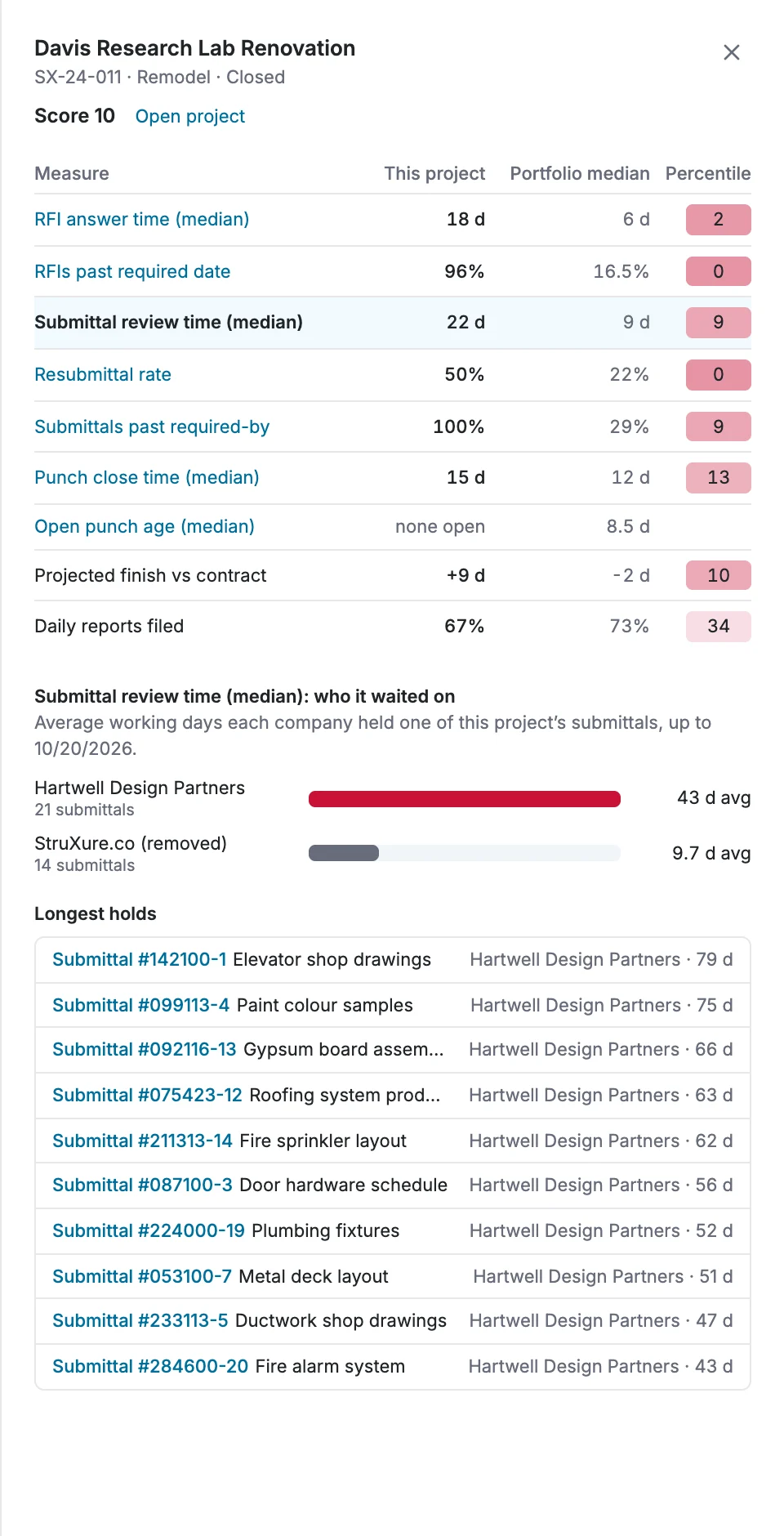
The measures
For each of the nine measures the panel shows:
- This project: its figure, or why there isn't one.
- Portfolio median: the middle figure among the projects shown.
- Percentile: where this project sits, 100 being best, shaded red or blue like the table.
Who the work waited on
- Click a measure's name. The RFI, submittal and punch measures can be clicked; Finish and Daily reports can't, because they have no records that wait on anyone.
The panel then shows:
- Who it waited on: each company that RFIs, submittals or punch items on this project waited on, with the number it held and the average working days it held each one. The slowest company's bar is red when it's slower than every other company. A person's time counts towards their company; no person is named.
- Longest holds: up to ten records held longest, with the company and the working days. "still held" means it's still waiting on that company. Records you're allowed to open are links with their titles; others show only their number.
Click the measure again to put it away, or the × to close the panel. The panel is part of the page address, so you can share a link to it.
Note
Hand-offs have been recorded since 10/06/2026. Time a record was held before then is estimated from its dates, and the panel says so when that applies.