
A deleted project isn't gone. It goes to the Recycle Bin tab on Home, and nobody can open it until it's restored.
Restore a project
- On Home, click the Recycle Bin tab at the end of the project tabs.
- Find the project. The list shows when it was Deleted, its number, Name and City / State.
- Click Restore.
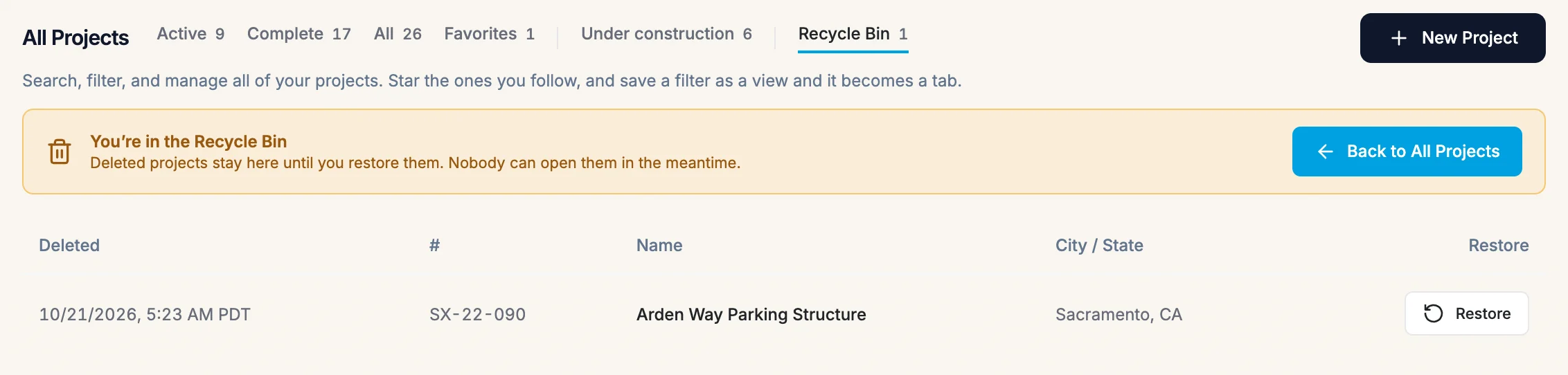
The project goes back on the project list exactly as it was, with its directory, its records and its own type lists. Click Back to All Projects to leave the Recycle Bin.
If someone else restored it first, Home says Nothing changed — somebody else got there first.
Who can restore
Restoring a project needs Project setup — Admin, the same access as creating one. Projects stay in the Recycle Bin until an administrator asks for one to be removed.