
When someone creates a project, the New Project wizard proposes the next number from your workspace's pattern, such as 2026-014. Whoever creates the project can always type their own instead, such as a number accounting already issued. A project admin can also change a project's number later. See Project numbers for that side.
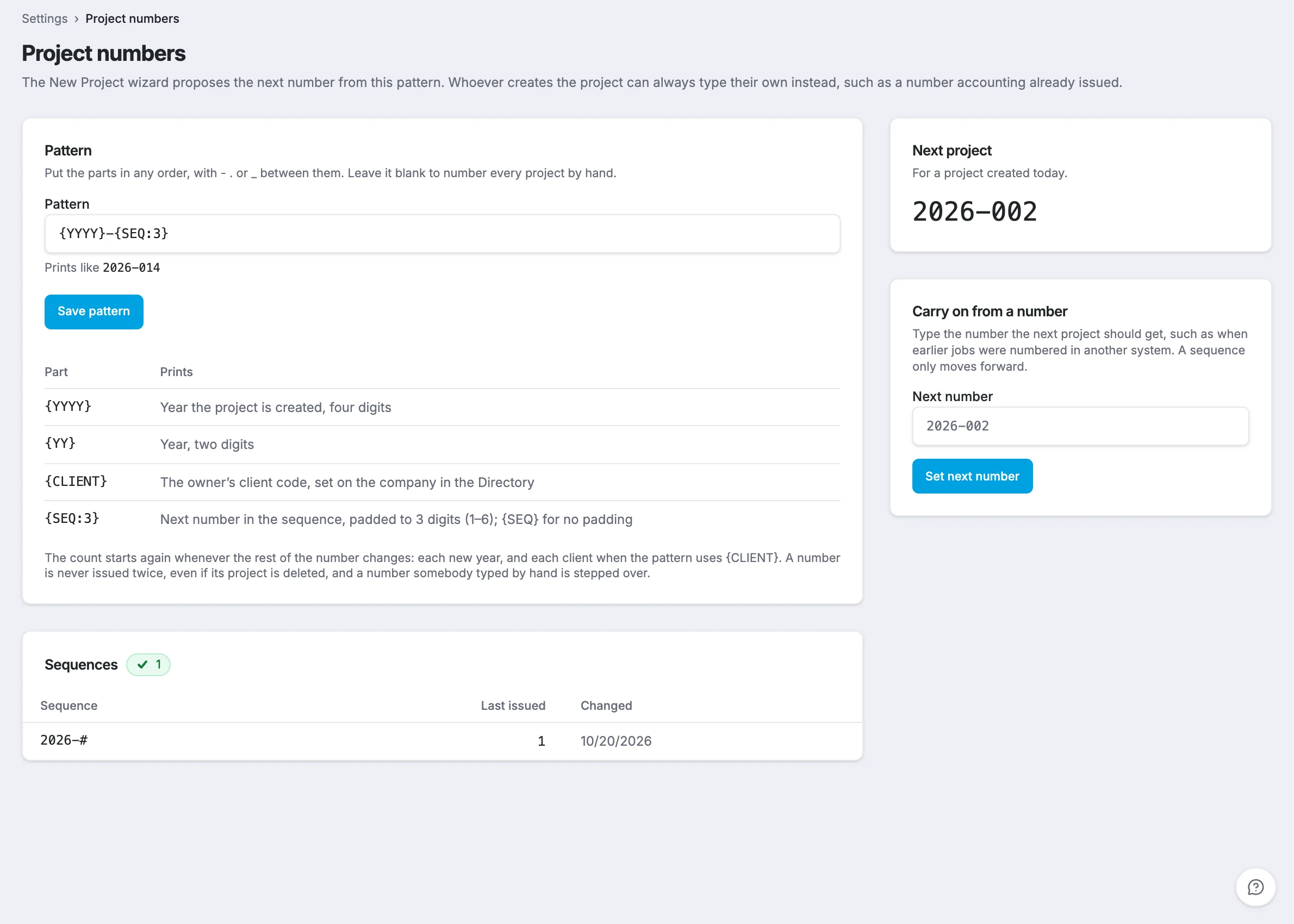
Set the pattern
- Go to Settings and open Project numbers.
- In Pattern, type the parts in any order, with
-,.or_between them. As you type, Prints like shows an example. - Click Save pattern.
The page says Saved. with an example of the numbers new projects will be proposed. Next project shows the number the next project created today would get.
The parts of a pattern
| Part | Prints |
|---|---|
{YYYY} |
The year the project is created, four digits |
{YY} |
The year, two digits |
{CLIENT} |
The owner's client code, set on the company in the Directory |
{SEQ:3} |
The next number in the sequence, padded to 3 digits (1 to 6). {SEQ} for no padding |
For example, {YYYY}-{SEQ:3} prints 2026-001, 2026-002 and so on. {CLIENT}-{YY}-{SEQ:2} prints ACME-26-01 for the first project for that client in 2026.
A pattern needs exactly one {SEQ}. When it uses {CLIENT}, put a separator before and after it.
Turn numbering off
Clear the Pattern box and click Save pattern. The page says Numbering is off. The wizard then proposes no number, and every project is numbered by hand.
How the count works
- The count starts again whenever the rest of the number changes: each new year, and each client when the pattern uses
{CLIENT}. - A number is never issued twice, even if its project is deleted.
- A number someone typed by hand is stepped over, so the next proposed number doesn't clash with it.
Sequences lists every count the pattern has started, such as 2026-#, with the Last issued number and when it last changed.
When the pattern uses {CLIENT}, Next project lists each client that has a client code, with its next number. A company gets a client code in the Directory, on the company's page, or from the New Project wizard.
Carry on from a number
If earlier jobs were numbered in another system, tell StruXure where to carry on from. This card only appears once a pattern is saved.
- Under Carry on from a number, type the number the next project should get in Next number, written the way the pattern prints it.
- Click Set next number.
The page says The next project in that sequence will be …. A sequence only moves forward: you can't set a number at or below one already issued.
If the pattern or number is refused
| Message | What to do |
|---|---|
| A pattern needs a sequence number, {SEQ}, or two projects would share a number. | Add {SEQ} or {SEQ:3}. |
| A pattern has one sequence number, not several. | Remove the extra {SEQ}. |
| {…} is not one of the parts a pattern can use. | Use only the parts in the table above. |
| Between the parts, use letters, digits and - _ . only. | Remove spaces and other characters. |
| Put a separator such as - after {CLIENT}, … (or before) | Add -, . or _ next to {CLIENT}. |
| The sequence is padded to between 1 and 6 digits. | Use {SEQ:1} to {SEQ:6}. |
| "…" does not fit the pattern … | Type the next number in the pattern's format. |
| This sequence has already issued up to … . | Choose a number above the one shown. |