
Module defaults pre-fill new records on every project, so people raising an RFI, submittal, punch item or observation don't start from a blank form. People can still change the pre-filled values on each record.
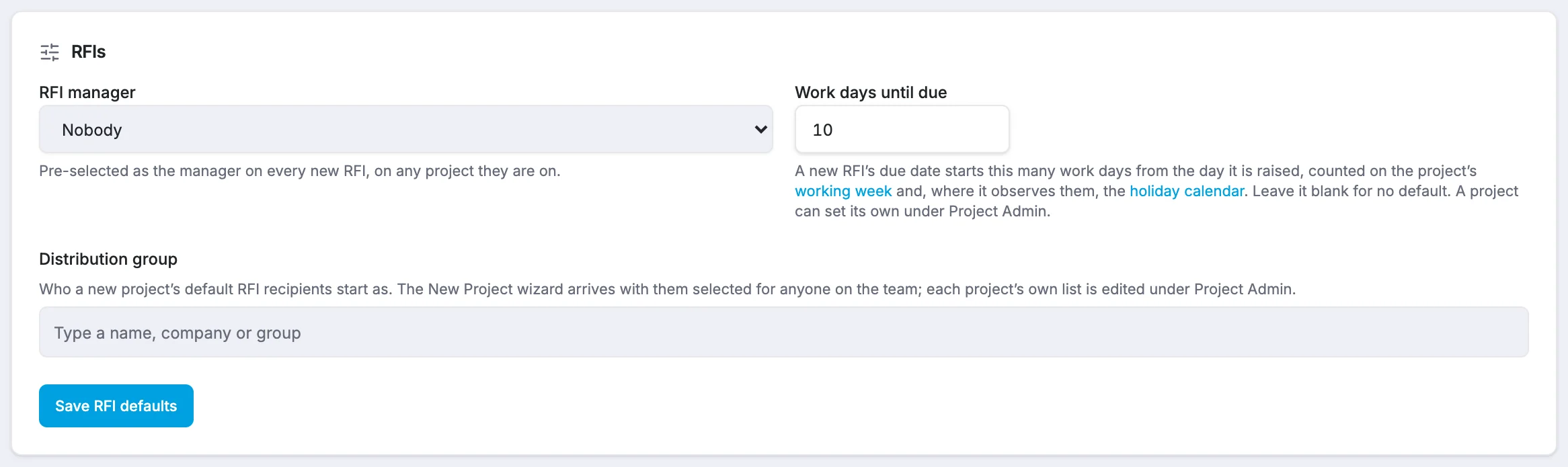
Go to Settings and open Module defaults. There is one card per module, in this order: RFIs, Submittals, Daily Reports, Daily Report Approvals, Drawings, Punch List, Observations and Specifications. Each card has its own save button, so saving one card never loses an edit you're making on another.
What each card sets
| Card | Fields |
|---|---|
| RFIs | RFI manager, Work days until due, Distribution group |
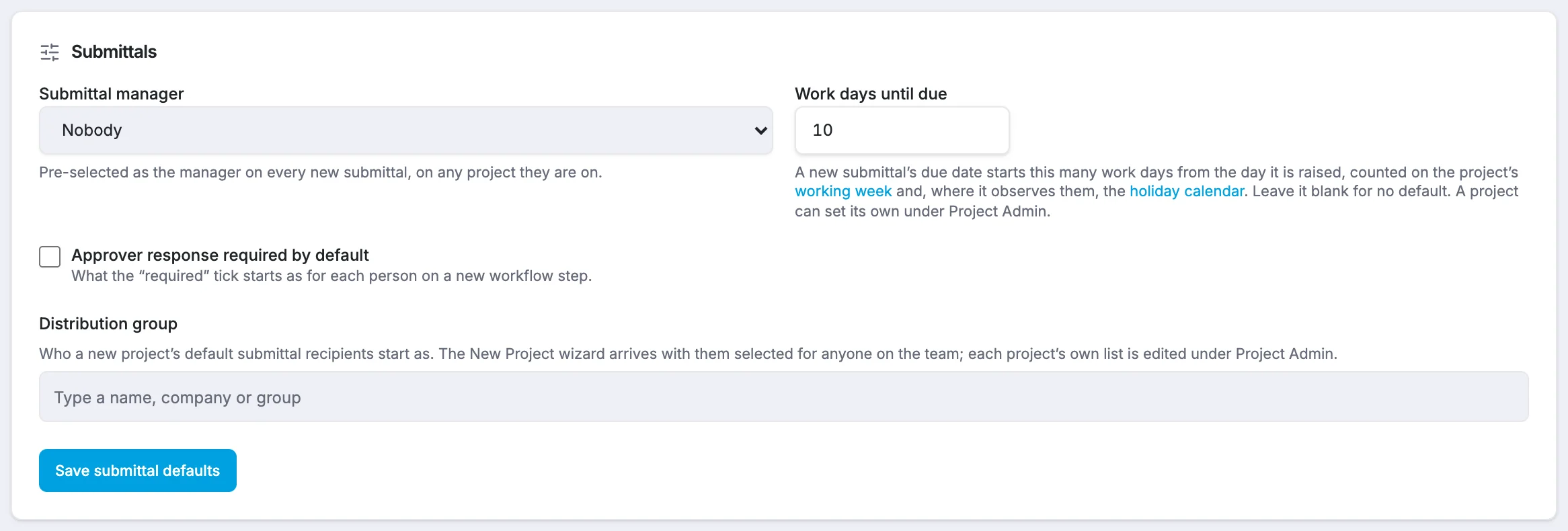
| Submittals | Submittal manager, Work days until due, Approver response required by default, Distribution group |
| Punch List | Default approver, Work days until due, Distribution group |
| Observations | Default Reviewer, Work days until due, Distribution group |
| Daily Reports | Distribution group |
| Drawings | Distribution group |
Daily Report Approvals has its own card. See Turn on Daily Report approvals.
Specifications
The Specifications card has one setting: Assign every page to a section. It's off unless you turn it on.
- Off: when a spec book is split, pages StruXure can't match to a section number (the cover, the table of contents, pages after a section ends that carry no section number) start as Unassigned pages, already ignored.
- On: every page goes to a section. Pages before the first section join the first section, blank pages join the section before them, and other pages without a section number join the next section, or the last one at the end of the book. Nothing starts ignored; reviewers ignore pages themselves.
The setting applies to spec books split after you save it. Books already in review keep their sections. See Fix how the book is split.
Manager and approver
RFI manager, Submittal manager, the punch list's Default approver and the observations' Default Reviewer are pre-selected on every new record, on any project they are on. On a project where that person isn't in the project's directory, the field starts empty instead. Choose Nobody for no default.
Work days until due
A new record's due date starts this many work days from the day it is raised. Enter a whole number from 0 to 365, or leave it blank for no default due date.
Work days are counted on the project's calendar: its working week and, where it observes them, the holiday calendar. Weekends and holidays are skipped. See Set the working week and schedule source and Keep the holiday calendar.
Approver response required by default
On the Submittals card. It sets what the required tick starts as for each person on a new submittal workflow step.
Distribution group
Who a new project's default recipients for that module start as. Click in the box and type a name, company or group, then pick from the list. Add all on a company's row, above the people, adds everyone there at once. Click × on a name to take it off.

Save a card
- Change the fields on one card.
- Click its save button: Save RFI defaults, Save submittal defaults, Save punch list defaults, Save daily report defaults, Save drawing defaults, Save observation defaults or Save specification defaults.
The card says RFIs defaults saved. (or the module's name) beside the button, and the page stays where you were.
How changes reach projects
- Manager, approver, Reviewer, work days and approver response flow through to every project that hasn't set its own, for records raised from now on. A project admin can override any of them, field by field, under the project's Admin > Module settings. See Set module defaults for one project.
- Distribution groups are only used when a project is created: the New Project wizard arrives with these people selected for anyone on the team. After that, each project keeps its own list, edited under its Admin page. Changing the group here doesn't change existing projects.
- Records already raised keep their due dates and managers.
For how each module uses these defaults, see RFI defaults, Submittal defaults, Set punch list defaults, Default recipients for daily reports, Drawing defaults, and Set observation defaults.
If a card won't save
| Message | What to do |
|---|---|
| Work days must be a whole number from 0 to 365. | Enter a whole number, or leave the box blank. |
| That manager is not an active person in the Directory. (or approver) | The person has been removed from the Directory. Choose someone else. |
| One of the distribution members is not an active person in the Directory. | Take that person off the group and save again. |